How billing works
What PrintPort charges your card for, when the charge happens, and where it is recorded.
5 min read
PrintPort charges the card you saved to make each order: material and labor, nothing else, with a $2.00 minimum per order. The charge happens once per order, at a specific moment, and every charge is recorded on your Finance page. This page covers what you are charged, when, and where it appears.
What you're charged for
The charge is the make cost, which is what it costs PrintPort to produce your order. It has two parts, both read directly from the real slice of your model.
- Material is the stocked price per gram of your chosen filament, multiplied by the sliced weight. It is not a flat rate: a heavier print or a more expensive filament costs more.
- Labor is $3.00 per print-hour, pro-rated for prints under an hour, so a 30-minute print is $1.50.
- Order minimum is $2.00. If material plus labor (plus any hardware) for the whole order comes to less than that, the charge is $2.00. It applies once per order, not per unit.
Hardware such as a MagSafe ring, magnets, threaded inserts, or screws adds its own part price with no additional labor.
Shipping is never on this charge
The exact make-cost formula is broken down on Costs & pricing.
| On your make-cost charge? | What |
|---|---|
| Yes | Material — real price/g × sliced weight |
| Yes | Labor — $3.00 per print-hour, pro-rated |
| Yes | Hardware part price (if the product includes hardware) |
| Yes | Assembly — $1.00 per part, only if you chose “Assemble it” |
| Yes | The $2.00 order minimum — only when the whole order’s make cost would be under $2.00 |
| No | The shipping label — billed to your own Shippo account |
| No | Any retail markup — your customer pays that to you, through your store |
- YesWhatMaterial — real price/g × sliced weight
- YesWhatLabor — $3.00 per print-hour, pro-rated
- YesWhatHardware part price (if the product includes hardware)
- YesWhatAssembly — $1.00 per part, only if you chose “Assemble it”
- YesWhatThe $2.00 order minimum — only when the whole order’s make cost would be under $2.00
- NoWhatThe shipping label — billed to your own Shippo account
- NoWhatAny retail markup — your customer pays that to you, through your store
For the calculation gram by gram and hour by hour, see Costs & pricing.
When your card is charged
Your card is charged at label purchase, not when the order is placed. PrintPort runs three steps in order, and money only moves on the last one.
- 1
Authorize a hold
PrintPort places a temporary hold on your main card for the make cost. A hold is not a charge; no money has moved yet. If your main card cannot authorize, PrintPort tries your other saved cards. - 2
Buy the shipping label
PrintPort buys the cheapest label on your connected Shippo account. The order ships from the PrintPort warehouse in Orange, CA. - 3
Capture the charge
Once the label succeeds, the hold is captured, and that is the moment your card is actually charged. If the label fails, the hold is cancelled and you pay nothing.
For this reason a charge appears on your Finance ledger at label purchase rather than at checkout. A print that has not reached the label step has, at most, a hold against it, never a settled charge.
Manual mode changes the timing, not the amount
By default PrintPort waits for you. Every new order sits as Held for approval, and nothing is charged until you open it and tap Approve. Approving runs the same authorize, label, capture sequence, so in manual mode your card is charged at the moment you approve, once the label buys.
Turn on automatic fulfillment in Settings and that sequence runs on its own the moment a sale lands, with no approval step and the same charge.
If a charge fails
Large-charge safety review
PrintPort guards against a runaway charge caused by a bad quantity, a duplicated line, or a model that sliced far heavier than expected. When a make cost would be unusually large, the order is held for a manual review instead of being charged automatically.
A money safeguard, not a problem with your file.
| Trigger | What happens |
|---|---|
| A make cost over $500 | The order is held for review instead of charged |
| Any single item over $200 | Same — held for review before any charge |
- A make cost over $500What happensThe order is held for review instead of charged
- Any single item over $200What happensSame — held for review before any charge
A held order requires PrintPort to clear it before it can charge, and the Retry card button will not force one through on its own. This is a backstop that keeps an unusual amount from reaching your card unreviewed. If an order appears stuck here, use Get help with this on the order to reach Support.
Where charges appear
PrintPort charges you as a Stripe customer, the same way any store charges a card on file. This has two practical consequences worth knowing.
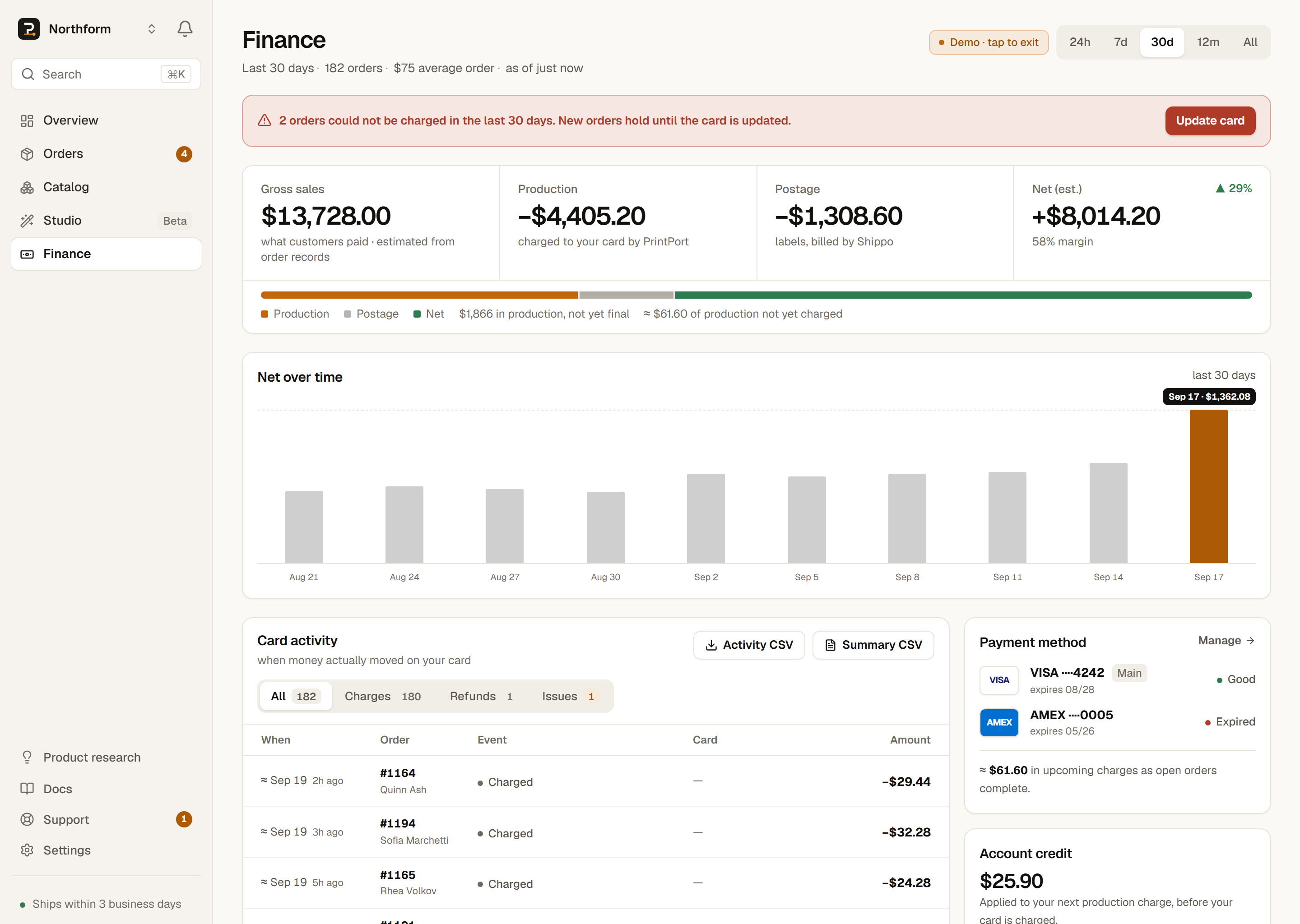
- No invoices or PDF bills. PrintPort does not generate an invoice or a downloadable PDF for each charge.
- No Stripe login. You are PrintPort’s customer, not a connected Stripe account, so there is no Stripe dashboard to sign into and no tax form issued to you by Stripe.
Instead, every settled charge, refund, and decline is recorded on your Finance page, which is your billing history. From there you can export the numbers as CSV for your own records or accountant.
- Card activity ledgerFinance page
- Every settled movement on your card — charges (captured), refunds, and declines — with filter tabs for All, Charges, Refunds, and Issues. Older orders show an “≈” date when the exact charge time predates the audit trail.
- Activity CSVexport
- A line-by-line export of the card-activity ledger for the range you are viewing.
- Summary CSVexport
- Your full profit-and-loss for the range — totals, net-over-time, and per-product and per-channel margins.
Holds don’t appear as charges
For the full tour of the Finance page — Gross sales, Production, Postage, Net, and the ledger — see Finance.
Custom orders are prepaid at checkout
Custom orders (Order parts) bill the opposite way. You place them yourself — a sample of your own design, or a run of up to 500 parts — and whoever places the order, normally you, prepays PrintPort the full total, parts and shipping, at Stripe checkout before anything is made. Your saved card is never charged for a custom order, and its shipping label is already paid.
How to tell them apart
custom_ number, and the order drawer states that your card is not charged. Everything on this page — the make-cost charge, the authorize, label, capture timing, and the charge guard — applies to store orders, where your saved card pays the make cost.